Lecture Notes · Week 2 work

Lecture 2: Process & Context

  • Context for use
  • Context of use
  • Verplank identifies at least eight distinctive phases, as shown below in the diagram:
Verplank, B. (2000). Eight distinctive phases [Diagram]. Retrieved from http://www.billverplank.com/Lecture/

  • Begins with an invention stage, through error, then goes to the idea with a design phase
  • Afterwards, scenario development is included, then an engineering phase of task analysis and modelling to a representation phase
  • Interactive designers use many tools to generate and identify potential solutions
  • They apply skills, tools, and observe problems that need to be solved and solutions. These are then afterwards communication
  • Project ideas can begin with pencil and paper, sketch books, sticky notes, note cards and whiteboards
  • Early visualisations with diagrams, models and flows help us distinguish potential directions and missing information
Figure composition of processing a design. [Diagram]. Retrieved from https://vimeo.com/319375610

• As designs process, designers need to have an advancing level of detail and fidelity, pen and paper and sketches to capture the concept
• Creating interactive prototypes leads to solid ideas
• Precedent research involves studying products, observing people and asking questions based on observations.
• After that is accomplished, the designer tests the prototypes

When designing an interaction:

  • What people are trying to do
  • How they may try to do it
  • What gets in the way or helps
  • Where they might be doing it
  • Example: a person logging into their bank account on their laptop to check their balance and confirm that a transaction has gone through or logging in while in the waiting line at a supermarket to check if they have enough money. Information is needed for different reasons and different times and locations, by using different devices and with difference urgencies. There is a context for the use and context of use.
  • Context scenarios are used to define the situation, people and their needs, so interaction designs can be created for their behaviour

What is the situation?

  • What’s the setting or environment in which the interface or the device will be used?
  • Is it public or private?
  • Is it conducive? Who will be using the device or interface?
  • Where they might be doing it

Who will be using the device or interface?

  • Will it be used by one person, or multiple people?
  • How long will the interface be used?
  • Will the person be able focus on their task or will they be interrupted while using it
  • What are the person’s needs and goals?

What are the person’s needs and goals?

  • What are they trying to accomplish or complete?

Does the experience need to be extremely simple?

  • How much complexity can be accepted?

Reflection

During the Lecture Pod of Week 2, the main topics designed process overview and context. One of the main subject matters that were brought to my attention was the explanation behind describing the difference between a context for use and context of use. It was highlighted through the example of an individual checking their balance on their laptop and confirming a transaction has gone through vs checking their balance while waiting in the line at the supermarket, to confirm they have enough money. This differentiation assisted me in understanding context, and what type of context to use in different situations. In addition, the questions that were shown at the end of the lecture pod helped me understand how designers create context scenarios.

Class Work · Toast work · Week 1 work

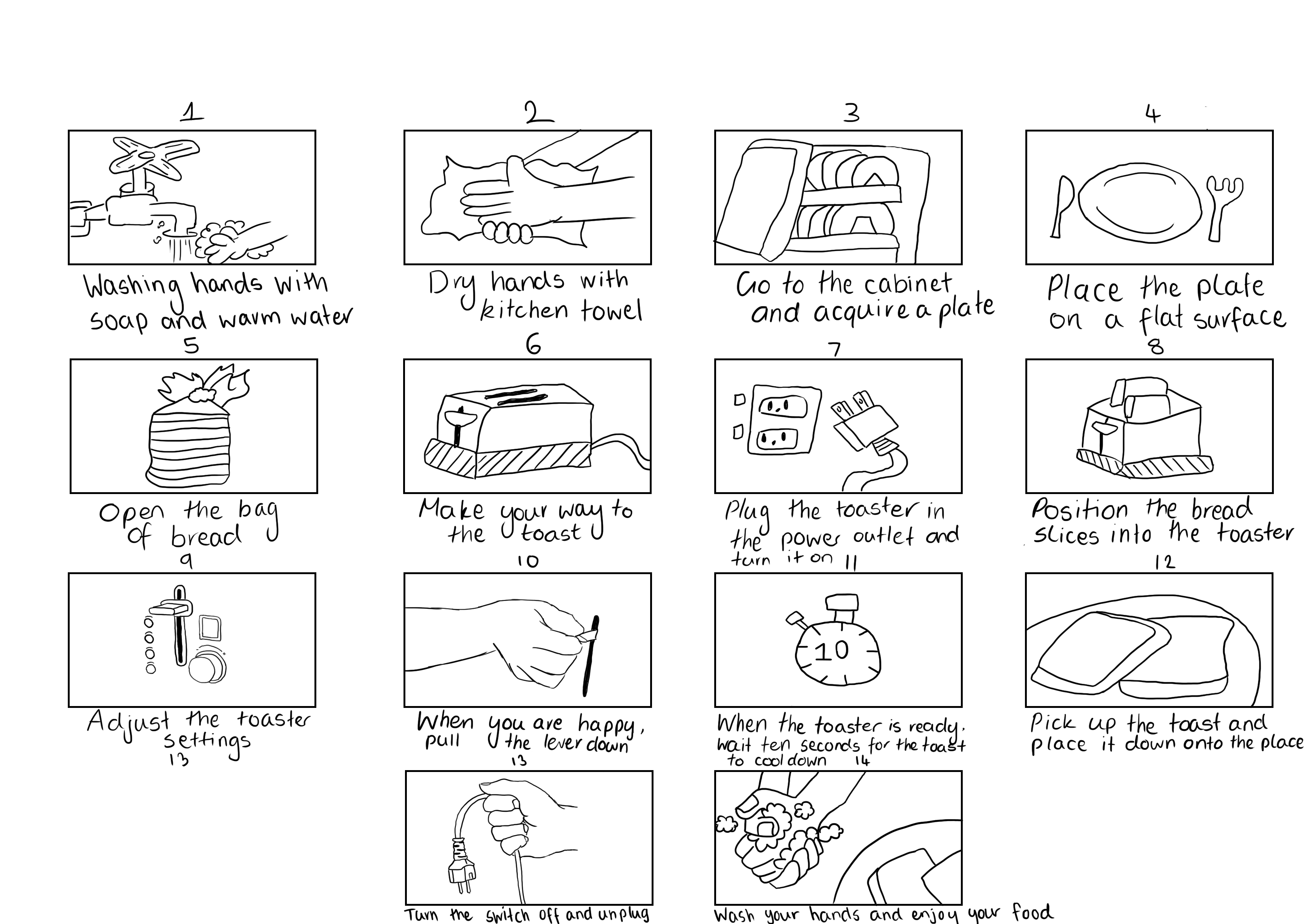
Step-by-step text description for cooking toast

1. Walk over to the sink and wash your hands with soap and warm water

2. Dry your hands with a kitchen towel

3. Go to a cabinet and acquire a plate

4. Place the plate on the counter or table, whatever is nearest to the toaster

5. Make your way to the pantry or refrigerator

6. Open the bag of bread and obtain two slices of bread

7. Put the bag back in the pantry/refrigerator

8. Make your way to the toaster, making sure the appliance is on a flat and safe surface.

9. Plug the toaster in the power outlet and turn the power switch on

10. Position the bread slices into the toaster

11. Adjust the toaster heat settings. how crunchy do you want your toast?

12. For a slight golden colour, put the setting on 2 and for a crunchy texture, 4

13. When you are happy with your settings, pull the lever down

14. In the meantime, make sure to keep your distance from the toaster as it may be hot

15. When the toaster is ready, wait ten seconds for the toast to cool down to avoid burning yourself

16. Test the toast, is it still hot? Wait another ten seconds

17. When safe, pick up the toast and place it down onto the plate

18. Head over to the toaster and turn the power switch off and unplug

19. Make your way to the sink again and wash your hands with soap and warm water

20. Enjoy your food!

Lecture Notes · Week 1 work

Lecture 1: Introduction to Interactive Design


Bill Verplank

  • A designer and researcher
  • He specialises in technology and graphics 
  • He creates concise diagrams to narrate his design interactions
  • He believes the key questions for interactive designers are “How do you do, feel and know?


Moik, C. Interactive Design professions in different areas [Diagram]. Retrieved from https://lloydkkidm.files.wordpress.com/2018/03/clement-mok.png?w=682&h=496

This image has an empty alt attribute; its file name is screen-shot-2019-03-10-at-10.42.47-pm.png

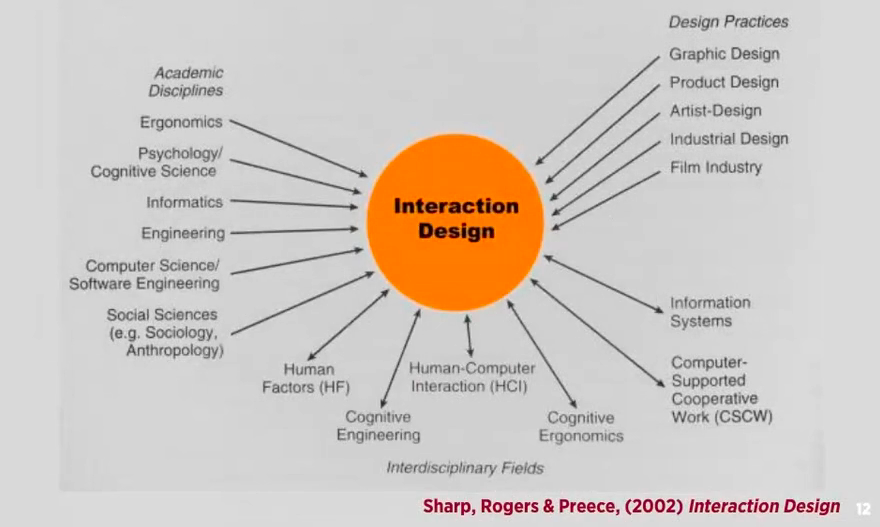
Preece, J., Rogers, Y., & Sharp, H. (2002). Interactive Design [Diagram]. Retrieved from https://www.researchgate.net/profile/Adam_Dunford/publication/320353022/figure/fig1/AS:550427449139200@1508243538383/the-trans-disciplinary-nature-of-interaction-design-Sharp-Rogers-Preece-2015.png

  • In relation to the chart above, all fields mentioned, are unique and contribute to the interactive design in different ways.

Cognitive Definition

How humans process in tasks; understanding, learning, reasoning etc.

Interactive Design definition

  • Designing interactive products to support people in their every day  and working lives” Sharp, Rogers & Preece (2002) Interaction Design, John Wiley & Sons, Inc. New York, NY, USA. http://www.id-book.com/
  • “The design of spaces for human communication & interaction” Winograd (1997) Beyond Calculation: The Next Fifty Years of Computing, Springer-Veriag

Interactivity

  • Relating to a program that responds to user activity (computer science)
  • Working together so the total effect is greater than the sum (2 or more)
  • Capable of acting on or influencing each other
  • Interactions eg. vending machine, book, mobile phone, online shopping website or verbal conversation

Continuums of Interactivity definition

Envision all experiences and products, as inhabiting continuum of interactivity

Reflection

During the Lecture pod of Week 1, I have grasped newly discovered information and knowledge about interactive design. One of the main points that were brought to my attention were Verplank’s statement, where he believes the key questions for an interactive designer are “how do you do, feel or know”. These three terms highlight the undergoing process of creating a design:

  • How do you do the product? In terms of creating, what is being used and controlled.
  • What roles does each part have?
  • How do you feel? in terms of hearing, seeing and touching, being the medium of the design
  • How do you know? What knowledge have you comprehended from your design, what pathways will you take in order to create a successful product.
    In conclusion, his statement heavily underlines the steps in which an interactive designer can take in order to create an adaptable design.